The NIIMBOT B21 is a Bluetooth thermal label maker built for practical labeling tasks, from organizing jars and supplies to preparing small business tags.
In this review niimbot b21 guide, the key question is whether its wider label range and app tools fit your routine.
NIIMBOT B21 Review Summary
The quick verdict
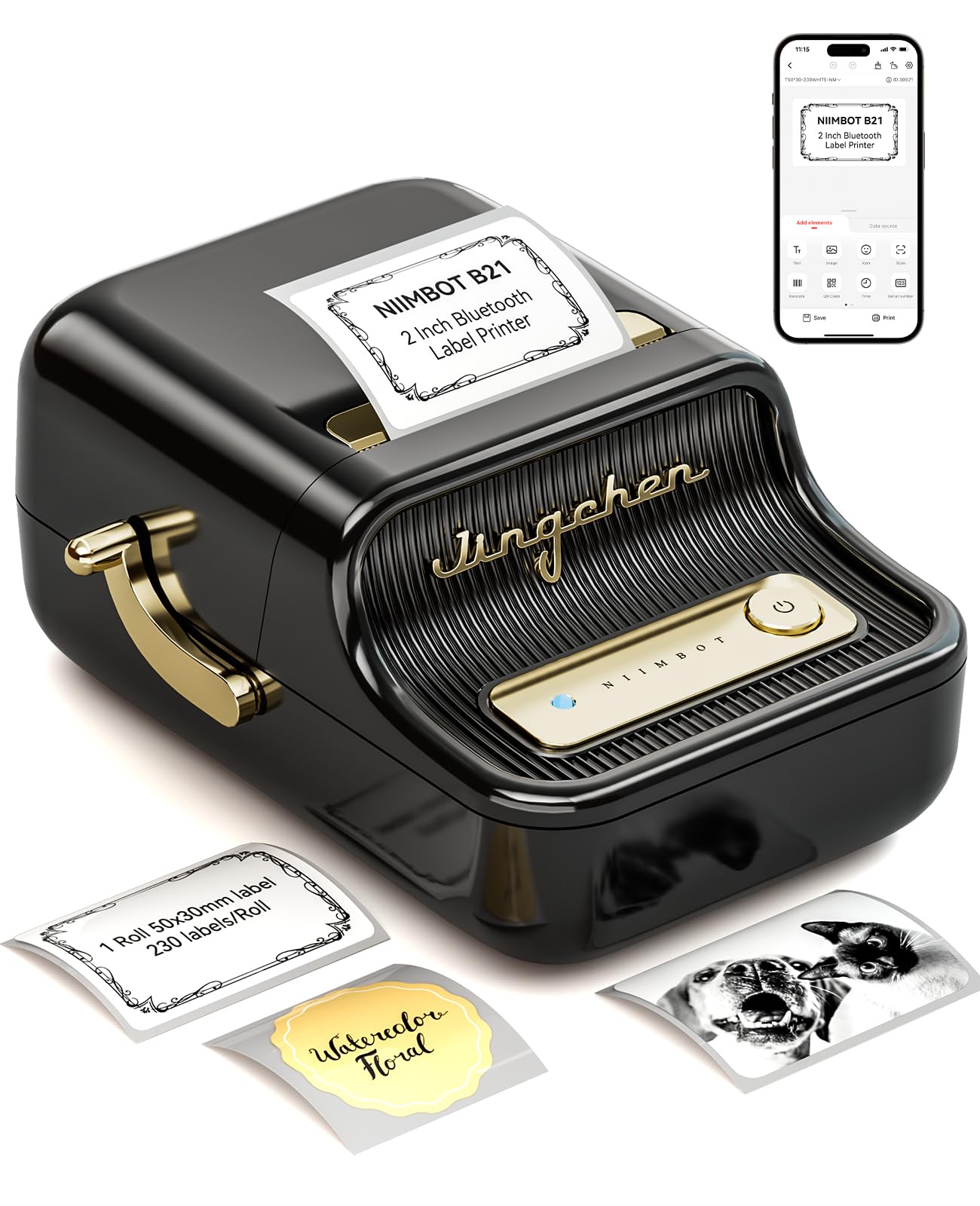
1,000+ ratings
Read Amazon ReviewsNIIMBOT B21
A versatile thermal label maker for small businesses, crafts, and home organization that need phone-based design and labels up to 2 inches wide.
- Prints on labels from 0.8 to 2 inches wide, supporting uses such as addresses, prices, dates, ingredients, barcodes, and gift tags.
- Uses thermal printing, so it does not require ink, toner, or carbon ribbon.
- Connects to the NIIMBOT app via Bluetooth for label creation and printing.
- The app includes more than 20 fonts and over 1,000 image materials, plus automatic template matching and image recognition.

Pros
- A wider supported label range than very small label makers, with media up to 2 inches wide.
- Useful app tools for varied designs and repeated label jobs, including Excel batch printing.
Consider before buying
- Design and printing are organized around the NIIMBOT phone app and Bluetooth, which may not suit workflows centered on a computer.
- Label paper remains necessary, so buyers should check available sizes and ongoing refill costs for their planned uses.
Read the full review summary
The B21 combines a 0.8- to 2-inch label-width range with Bluetooth printing through the NIIMBOT app.
That gives it room for more than tiny identification stickers: buyers can design labels for addresses, prices, dates, ingredients, barcodes, and gifts, then print them from a phone.
The thermal system also avoids ink, toner, and ribbon purchases; ongoing supplies are label paper.
Its app supports templates, more than 20 fonts, over 1,000 image materials, image recognition, Excel batch printing, and scanning and identifying 1D or 2D codes.
This makes the B21 a plausible fit for a small shop, craft business, classroom, or household that wants flexible designs and occasional batches.
The tradeoff is that it is app-centered, so buyers should confirm that a phone-based setup and the label sizes they plan to use suit their workflow.
The buying factors
NIIMBOT B21 Scorecard
Editorial scores reflect listed features and buyer fit; they are not laboratory measurements or customer ratings.
Label-width flexibility
The supported 0.8- to 2-inch range accommodates a broad mix of compact labels and larger tags.
App design tools
Templates, fonts, image materials, image recognition, and code tools give buyers several ways to create labels.
Batch-print utility
Excel batch printing is useful when repeating labels, particularly for small business or classroom tasks.
Phone-based convenience
Bluetooth connection and app-based creation support a mobile workflow without requiring a separate desktop setup.
Supply simplicity
Thermal printing removes the need for ink, toner, or ribbon, though label paper remains an ongoing supply.
Portable work time
The stated battery working time is up to four hours per charge, with automatic shutdown after a 15-minute pause.
Key Features and Specifications of NIIMBOT B21
- Prints on labels from 0.8 to 2 inches wide, supporting uses such as addresses, prices, dates, ingredients, barcodes, and gift tags.
- Uses thermal printing, so it does not require ink, toner, or carbon ribbon.
- Connects to the NIIMBOT app via Bluetooth for label creation and printing.
- The app includes more than 20 fonts and over 1,000 image materials, plus automatic template matching and image recognition.
- Supports Excel batch printing and scanning to identify 1D and 2D codes.
- A charge supports up to four hours of working time; the printer shuts down automatically after a 15-minute pause.
Pros and Cons of NIIMBOT B21
Pros
- A wider supported label range than very small label makers, with media up to 2 inches wide.
- Useful app tools for varied designs and repeated label jobs, including Excel batch printing.
- Thermal operation avoids ink, toner, and ribbon purchases.
- The stated battery life and automatic pause shutdown support portable, intermittent use.
Consider before buying
- Design and printing are organized around the NIIMBOT phone app and Bluetooth, which may not suit workflows centered on a computer.
- Label paper remains necessary, so buyers should check available sizes and ongoing refill costs for their planned uses.
- The stated battery working time is up to four hours; users with longer sessions may need to plan around charging.
Who Should Buy NIIMBOT B21?
Good fit
Consider the B21 if you need one compact printer for several kinds of small labels.
Its 0.8- to 2-inch width range can handle both narrow identifiers and larger address, price, ingredient, or gift labels, while thermal printing keeps the routine free of ink and toner replenishment.
It is also a strong fit for people who expect to create or repeat designs from a phone.
Template matching, image recognition, code scanning, and Excel batch printing can reduce repeated setup for small business inventories, classroom materials, or craft products.
Before choosing it, check that the label widths you need are supported and that compatible refill paper fits your budget.
Who should skip it
Skip the B21 if your main requirement is a desktop-first workflow or printing labels outside its supported width range. The described setup is built around the mobile app and Bluetooth, and the maximum label width is 2 inches.
It may also be more than you need for occasional narrow home labels if you would not use the broader width range or app design tools.
In that case, compare a simpler compact label maker against the label sizes and batch features you actually need.
NIIMBOT B21 review: where its width and app tools matter
A useful middle ground in label size
The 0.8- to 2-inch range is central to the B21’s appeal. It gives buyers more layout room than a device limited to very small identification labels, while remaining focused on label-paper tasks rather than full-size shipping labels.
That flexibility can help when the same workspace needs compact tags for cables and supplies plus larger labels for jars, pricing, or addresses.
Design tools for repeatable work
The app features go beyond typing a short name and pressing print. Template matching can speed up common formats, while image recognition and code scanning give users ways to bring existing text or codes into a design.
Excel batch printing is particularly relevant when many labels share a format but differ in their text, such as inventory or classroom sets.
Thermal printing and supply planning
Thermal operation removes ink, toner, and ribbon from the recurring supply list, which simplifies routine maintenance. It does not eliminate consumable costs: label paper is still needed.
Buyers should plan around the widths they intend to use and the availability and cost of appropriate refills.
Portable use with a practical limit
The battery is described as supporting up to four hours of work per charge, and an automatic shutdown after a 15-minute pause helps limit idle power use.
That suggests a device suited to intermittent sessions around a shop, classroom, or home. For longer printing runs, consider how often you can recharge and whether the stated working time matches the length of your jobs.
Alternatives to NIIMBOT B21
Desktop Label Printers alternative

6,000+ ratings
Read Amazon ReviewsPhomemo M110
Compare the M110 if you want a similar phone-connected thermal printer with a stated 20- to 50-mm range and a bundle that includes several label sizes.
The B21 may suit you better if its stated 0.8- to 2-inch range and NIIMBOT app tools align more closely with your label formats.
- The Phomemo M110 supports a 20- to 50-mm label-width range, prints monochrome thermal labels, and works with the Print Master app for repeated printing and Excel batch jobs.
- The supplied package description includes three label sizes and a charging cable.
- The NIIMBOT B21 supports labels from 0.8 to 2 inches wide and offers app features including image recognition, code scanning, and Excel batch printing.
Desktop Label Printers alternative

28,000+ ratings
Read Amazon ReviewsPhomemo D30
Choose the D30 for a smaller-format portable workflow where continuous or fixed-length tapes and the included tape variety are useful.
The B21 is the more relevant choice when your tasks call for labels up to 2 inches wide and you want the NIIMBOT app’s specified code-scanning and image-recognition tools.
- The Phomemo D30 is a pocketable Bluetooth label maker that supports continuous tapes and fixed-length labels.
- Its app includes templates, symbols, frames, and tools for Excel, barcodes, QR codes, images, and OCR; the described bundle includes white, gold, and clear tapes.
- The NIIMBOT B21 supports labels up to 2 inches wide and includes Excel batch printing alongside image-recognition and code features.
Is NIIMBOT B21 Worth It?
The NIIMBOT B21 is worth considering if you want a flexible thermal label maker for small business, classroom, craft, or household jobs.
Its 0.8- to 2-inch media range, phone-based design tools, and Excel batch printing cover a useful mix of one-off and repeated tasks.
Buy it if mobile app creation is a good fit and you have checked the refill sizes and paper costs for your routine.
Look elsewhere if you need a desktop-centered workflow or labels wider than 2 inches; the B21’s value depends on putting its extra width and design tools to regular use.
Your review at a glance
1,000+ ratings
Read Amazon ReviewsNIIMBOT B21
A versatile thermal label maker for small businesses, crafts, and home organization that need phone-based design and labels up to 2 inches wide.
- Prints on labels from 0.8 to 2 inches wide, supporting uses such as addresses, prices, dates, ingredients, barcodes, and gift tags.
- Uses thermal printing, so it does not require ink, toner, or carbon ribbon.
- Connects to the NIIMBOT app via Bluetooth for label creation and printing.
- The app includes more than 20 fonts and over 1,000 image materials, plus automatic template matching and image recognition.